
Portal
Draw content in a host elsewhere on screen while it stays in place in the React tree
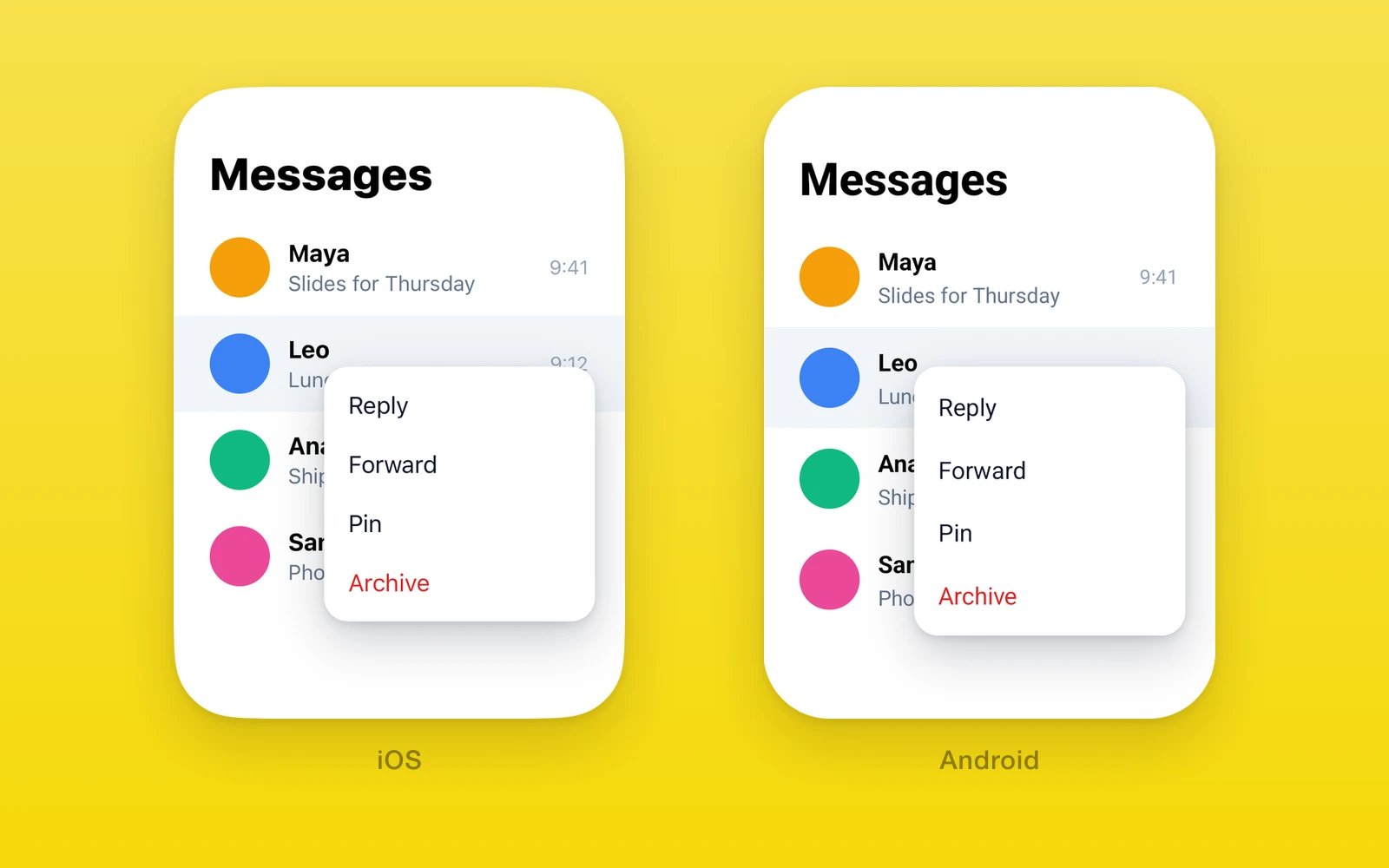
One.UI.Portal draws its children inside a One.UI.PortalHost somewhere
else on screen, while they stay where you wrote them in the React tree. Reach
for it when content must escape its parent’s clip or stacking: a menu opened
from a list row, a tooltip, a toast, a sheet drawn above everything.
Because the React tree does not change, the moved content keeps its context, state, and event handlers. No provider is needed. On iOS and Android the move happens to the native views themselves; on web it moves DOM nodes.
Usage
import { StyleSheet, View } from 'react-native'import { One } from 'one'
function Screen() {  return (    <View style={{ flex: 1 }}>      <MessageList />      <One.UI.PortalHost name="overlay" style={StyleSheet.absoluteFill} />    </View>  )}
function MessageRow({ menuOpen }: { menuOpen: boolean }) {  return (    <View style={{ overflow: 'hidden' }}>      <RowContent />      {menuOpen && (        <One.UI.Portal hostName="overlay">          <RowMenu />        </One.UI.Portal>      )}    </View>  )}
The menu draws in the full-screen host, above the list and outside the row’s clip, and still reads the row’s props and context.
How it works
Moving the views. Hosts and portals register by name in a native registry
(OneNativePortalRegistry on iOS, OnePortalRegistry on Android). When a
portal names a host that is in a window, the registry moves the portal’s child
views into the host view. React keeps them under the portal in its own tree,
so nothing re-mounts and no state is lost. On Android an attached child is
detached and re-attached rather than removed, so it stays attached to the
window during the move.
Layout. While hosted, the portal reports the host’s size and its offset
from the host to its Fabric shadow node. The shadow node then lays the portal
out as an absolute box the size of the host, translated onto it. Children lay
out against the host’s size, so percentages and right and bottom offsets
work as if they were written inside the host, and the source position takes
no space. When the host resizes, the portal lays out again.
Touches. A host never takes touches itself: on iOS its hit test skips itself, and on Android it uses box-none pointer events. A full-screen host blocks nothing below it; only its children and portaled content receive touches.
Web. The portal renders its children with React’s createPortal into a
container element, and appends that container to the host’s element. The
host takes no pointer events while its content does.
API reference
| One.UI.Portal | Type | Description |
|---|---|---|
children (required)ReactNodeThe content to move. | ReactNode | The content to move. |
hostNamestringThe host to draw in. Without it, children draw in place. | string | The host to draw in. Without it, children draw in place. |
namestringA later portal with the same name replaces this one. | string | A later portal with the same name replaces this one. |
Portal also takes View props, applied to the view around its children.
| One.UI.PortalHost | Type | Description |
|---|---|---|
name (required)stringThe name portals pass as hostName. | string | The name portals pass as hostName. |
childrenReactNodeThe host's own content, drawn below its portals. | ReactNode | The host's own content, drawn below its portals. |
PortalHost also takes View props. Its style sets the area portals fill.
Platform differences
| iOS | Android | Web | |
|---|---|---|---|
| What moves | Native views | Native views | DOM nodes |
| Layout | Shadow node, sized to the host | Shadow node, sized to the host | CSS, absolute in the host |
Limits and gotchas
- Order follows mount order. Portals draw above the host’s own children, in the order they mounted, so the newest is on top.
- Names replace across all hosts. A portal is hidden while any later
portal with the same
nameis mounted, whichever host that one targets. Unmount the later one and the earlier one shows again. Portals without a name never replace each other. - A missing host means in place. If no host with that name is in a window, the portal draws where it is written. It moves when the host mounts, and moves back when the host unmounts.
- Changing
hostNamemoves, it does not re-mount. The same views and state move to the new host. - Mount the host high enough. A host lays content out in its own box and clips like any view, so a host meant for overlays belongs near the root, filling the screen.
Examples
Show a toast above every screen
import { StyleSheet, Text, View } from 'react-native'import { One, Slot } from 'one'
export default function Layout() {  return (    <View style={{ flex: 1 }}>      <Slot />      <One.UI.PortalHost name="toasts" style={StyleSheet.absoluteFill} />    </View>  )}
function Toast({ message }: { message: string }) {  return (    <One.UI.Portal hostName="toasts" name="toast">      <View style={{ position: 'absolute', left: 16, right: 16, bottom: 48 }}>        <Text>{message}</Text>      </View>    </One.UI.Portal>  )}
The host sits in the root layout, so any screen can show a toast. Naming the
portal toast means a new toast hides the previous one instead of stacking,
and bottom: 48 measures from the bottom of the host, not of the screen that
rendered it.
Keep an open menu’s state while it moves
import { useState } from 'react'import { Button, View } from 'react-native'import { One } from 'one'
function Row({ floating }: { floating: boolean }) {  const [count, setCount] = useState(0)  return (    <View>      <One.UI.Portal hostName={floating ? 'overlay' : undefined}>        <Button title={`Tapped ${count}`} onPress={() => setCount(count + 1)} />      </One.UI.Portal>    </View>  )}
Toggling floating moves the button between the row and the overlay host.
count survives because the button never unmounts.
Migrating from react-native-teleport
Import One.UI.Portal and One.UI.PortalHost in place of the
react-native-teleport components, remove PortalProvider, and mount any
root overlay host yourself.
Credit
The native portal implementation is adapted from react-native-teleport by Kiryl Ziusko.
Edit this page on GitHub.